Inbox-to-CRM pilot
Your team copies sales enquiries from a shared inbox into a CRM.
I build custom AI applications and integrate AI into the software and workflows your team already uses. Bring one job you want to improve. If it fits, I’ll define the first project and quote a fixed price after a free scoping call.
Pick the job you want to improve. Each option shows what we could build and what a first project would prove.
Handle sales enquiries, support tickets and recurring customer conversations with review where it matters.
Turn shared-inbox enquiries, forms or call notes into proposed CRM updates, follow-up tasks and draft replies.
First project. Start with one inbox and one CRM. Measure handling time, field accuracy and duplicate prevention.
Explore the Inbox-to-CRM pilotClassify tickets, look up permitted account or order details, draft a sourced reply and route exceptions to staff.
First project. Start with one ticket category. Measure time to first response, draft acceptance and correct escalation.
Try the source-citation demoAdd dictation or spoken guidance for field notes, customer portals or support handovers, with a text or staff fallback.
First project. Start with one voice task. Agree consent and retention, then check transcript quality and handover accuracy.
Extract data from business documents, reconcile records, and connect applications through reliable APIs.
Extract fields from invoices, purchase orders or forms, check them against existing records, and send exceptions to review before posting.
First project. Start with one document type. Measure field accuracy, handling time and exceptions correctly caught.
See a sample review workflowCombine approved CRM, project or support records into a briefing that explains changes, cites the records and flags decisions.
First project. Start with one weekly report. Compare it with known figures and the time the team already spends preparing it.
Expose a reusable extraction, search, classification or generation operation to existing systems, with typed responses, authentication and safe retries.
First project. Start with one operation. Test expected responses, failures, replay and handover with the client’s developers.
Explore custom API designGive staff sourced answers and use approved project material to guide technical work.
Answer questions from approved policies, wikis and shared drives with source citations and access tied to the user’s permissions.
First project. Start with one team’s documents. Check a set of real questions, including outdated policies and answers the assistant should escalate.
Try the sample document assistantExplain a codebase, trace dependencies, summarise incidents from approved logs, or assemble a proposed change with evidence for review.
First project. Start with read-only onboarding for one repository. Check reference accuracy and whether developers can complete representative tasks.
See the Software Lab case studyMap an existing workflow and its systems, compare models on representative samples, and assess expected usage, review and integration effort.
First project. Get a written baseline, acceptance criteria and a fixed-price pilot proposal if there is a fit.
See how model and deployment choices affect costBuild an assistant into an application, commission a personal agent or harness, or give an existing assistant governed tool access.
Add a feature that explains a report, finds a record, guides a form or prepares an action in the screen the user is already on.
First project. Start with one task in one application. Compare completion rates, time on task and requests for help.
Build a role-specific assistant for an owner, professional or team member. It can brief, search, draft, or prepare approved actions using the person’s sources and workflow.
First project. Start with one role and one recurring task. Measure time saved, source accuracy and edits needed.
Explore personal AI agentsBuild the application and runtime that manages models, context, tools, approvals and recovery for a repeatable workflow.
First project. Start with one workflow. Check output quality, the approval path, interrupted runs and the cost per completed task.
Explore custom AI harnessesConnect an existing AI assistant to scoped tools for searching records, inspecting projects or preparing changes, with confirmation where needed.
First project. Start with a small toolset for one workflow. Check permissions, response sizes and approval behaviour.
Explore TERA MCP servicesYour team copies sales enquiries from a shared inbox into a CRM.
Two systems need to exchange records reliably, including when a request is retried.
Your desktop AI assistant needs access to tools with clear approval rules.
Your team needs an AI application that can run a repeatable workflow with the right tools and approvals.
You want an assistant designed around one person’s role, sources and recurring work.
Inbox-to-CRM pilot for B2B sales teams
I’ll build a fixed-scope pilot for one shared inbox and one CRM. Your team reviews proposed record updates, tasks and follow-up drafts before anything is applied or sent.
Allow 2–4 weeks for the pilot.
The scoping call is free. If it’s a fit, I’ll send the scope, success criteria and fixed price in writing before work begins. What the pilot includes
See the LLM cost estimates and assumptions →
Teams that know AI should help but not yet where, or what it would cost.
I map how the work is done today, find the tasks where AI saves the most time or money, and price each one in model tokens and build effort.
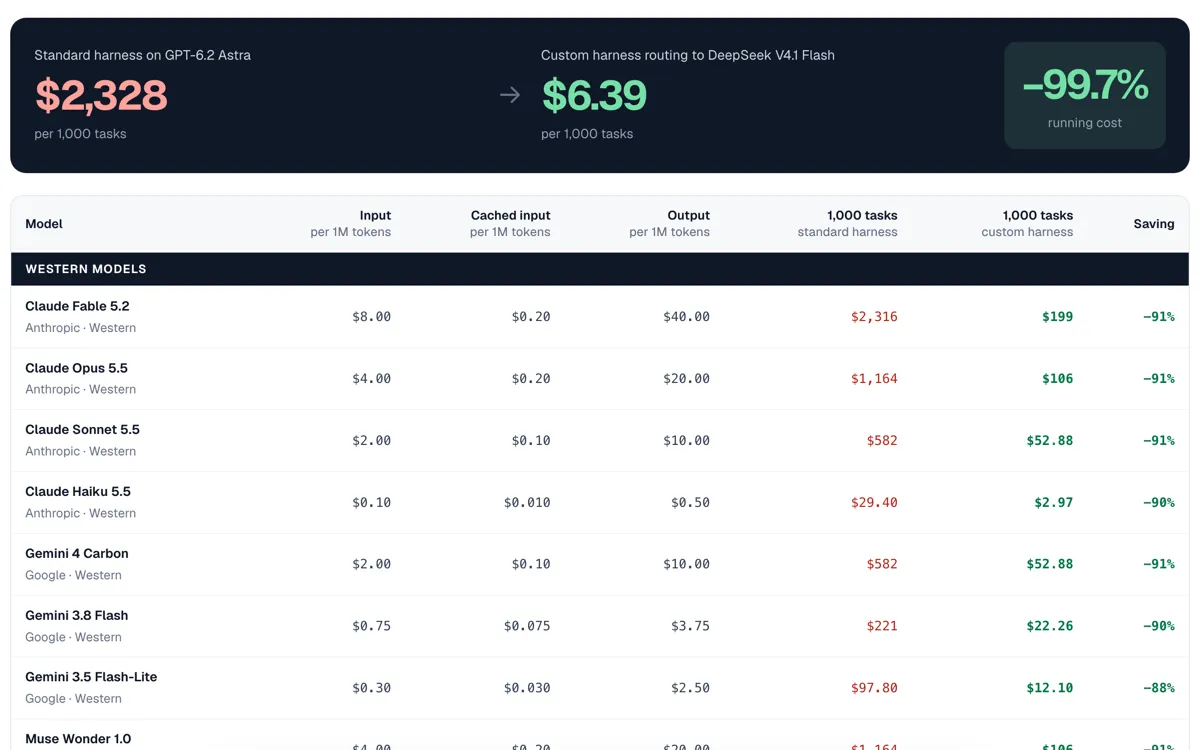 Already built27 models pricedThe cost model I use to price a workload on a standard and a custom harness, open on this site.See the cost comparison →
Ideas that need to show they work on your own data before a full build is funded.
A working prototype on your real documents, files or records, with an evaluation set that measures whether it is good enough and what each run costs.
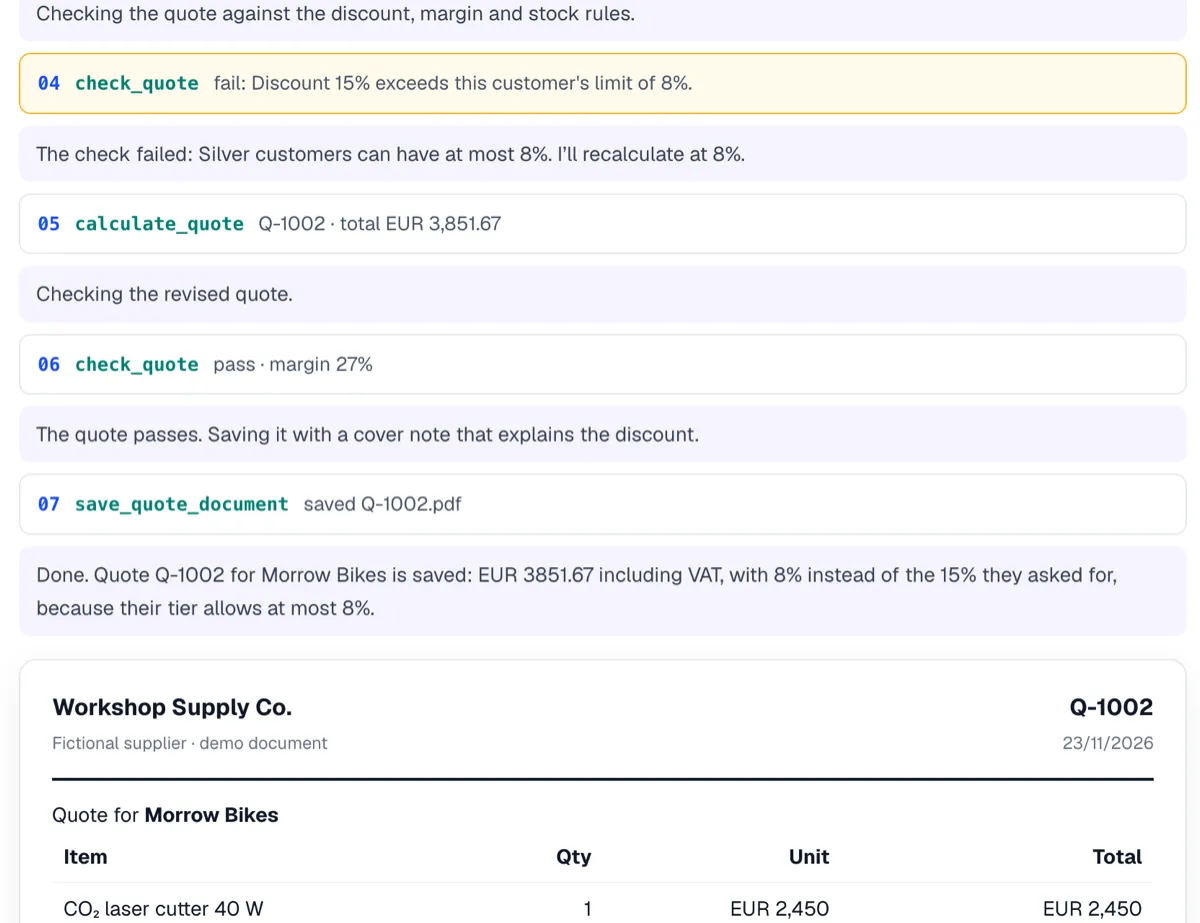 Already built4 working demosEach demo on this site is the size of a first proof of concept: sample data and checks, with live model runs where available.Try the demos →
Teams that want AI to produce finished professional work, not just text in a chat.
An agent harness built around your file types, programs and standards: tools the model can use, checks it must pass, approvals a person gives, and budgets that keep token spend low.
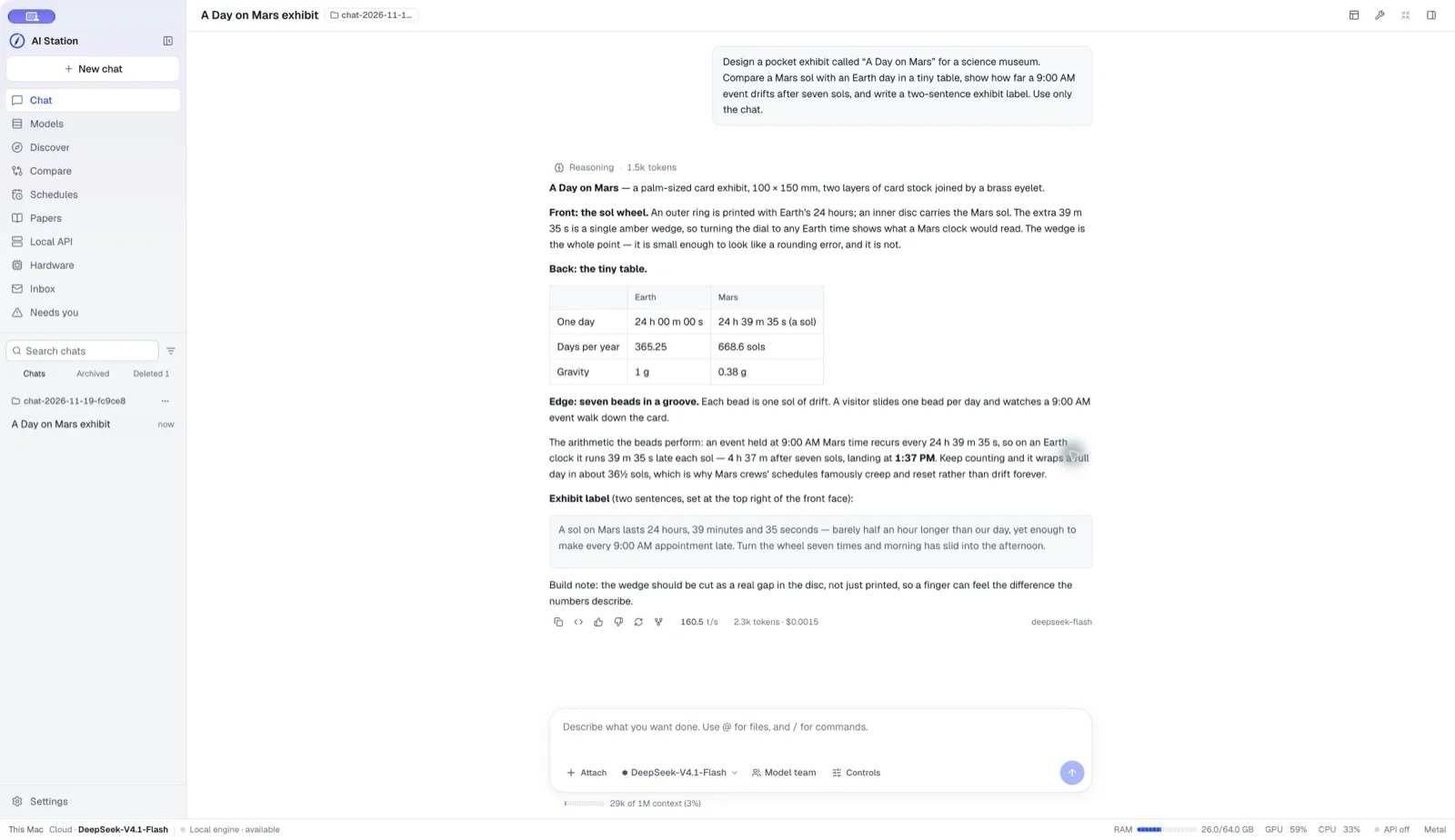 Already built17 of 17 files for about $0.40AI Station’s engines let an inexpensive model make finished professional files, from spreadsheets to STEP CAD.See AI Station →
Sales, recruiting and service teams who lose time to data entry, follow-ups and research.
A CRM, or an AI layer on the one you already use, that enriches records, scores leads, summarises calls and emails, drafts follow-ups for approval and tells each person what to do next.
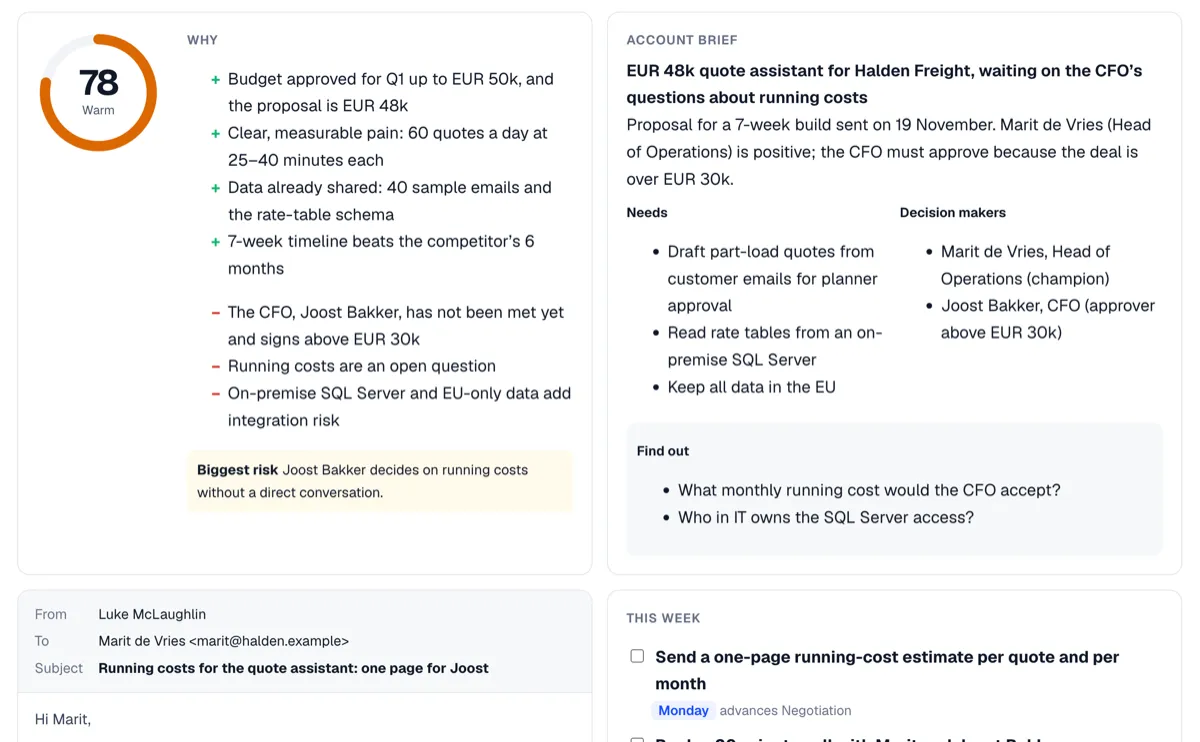 Already built4 AI tasks per recordScore, brief, follow-up and weekly plan, each returned as structured data and held for approval.Try the AI CRM →
Organisations whose knowledge sits in handbooks, tickets, wikis and shared drives.
An assistant that answers from your own documents and shows the passage behind every answer, respects who may see what, and is tested against questions your team really asks.
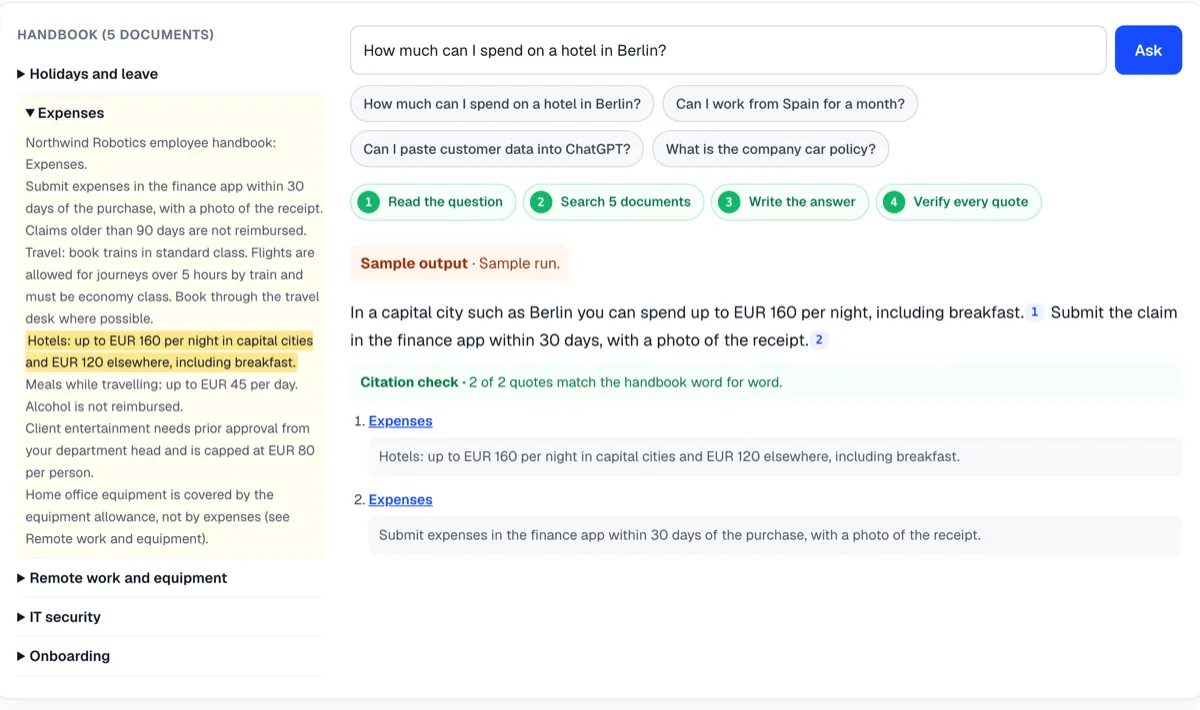 Already builtEvery quote verifiedEach statement carries a quote that is checked word for word against the source document.Try document Q&A →
Teams whose data cannot leave their own machines or their own cloud.
Open-weight models running on your hardware or private cloud, sized to each machine, exposed through the same APIs your tools already speak.
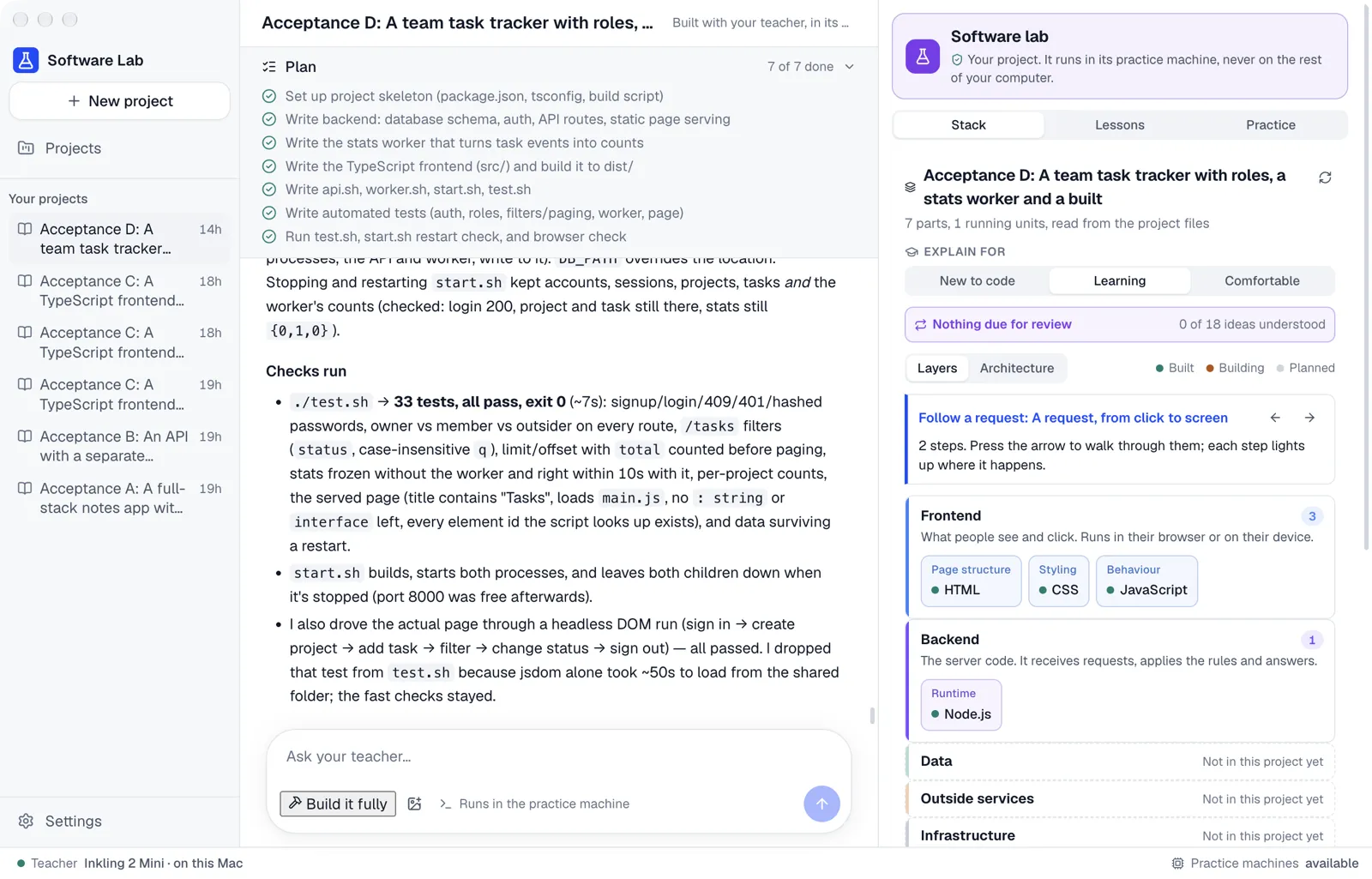 Already built31 of 31 checks on a local modelA model running on a Mac built three complete applications in Software Lab, at no model cost.Watch it build an app →
Repetitive work that moves between inboxes, forms, spreadsheets and business systems.
Automations that read an email, form or document, update the right system, draft the reply and wait for a person to approve anything that matters.
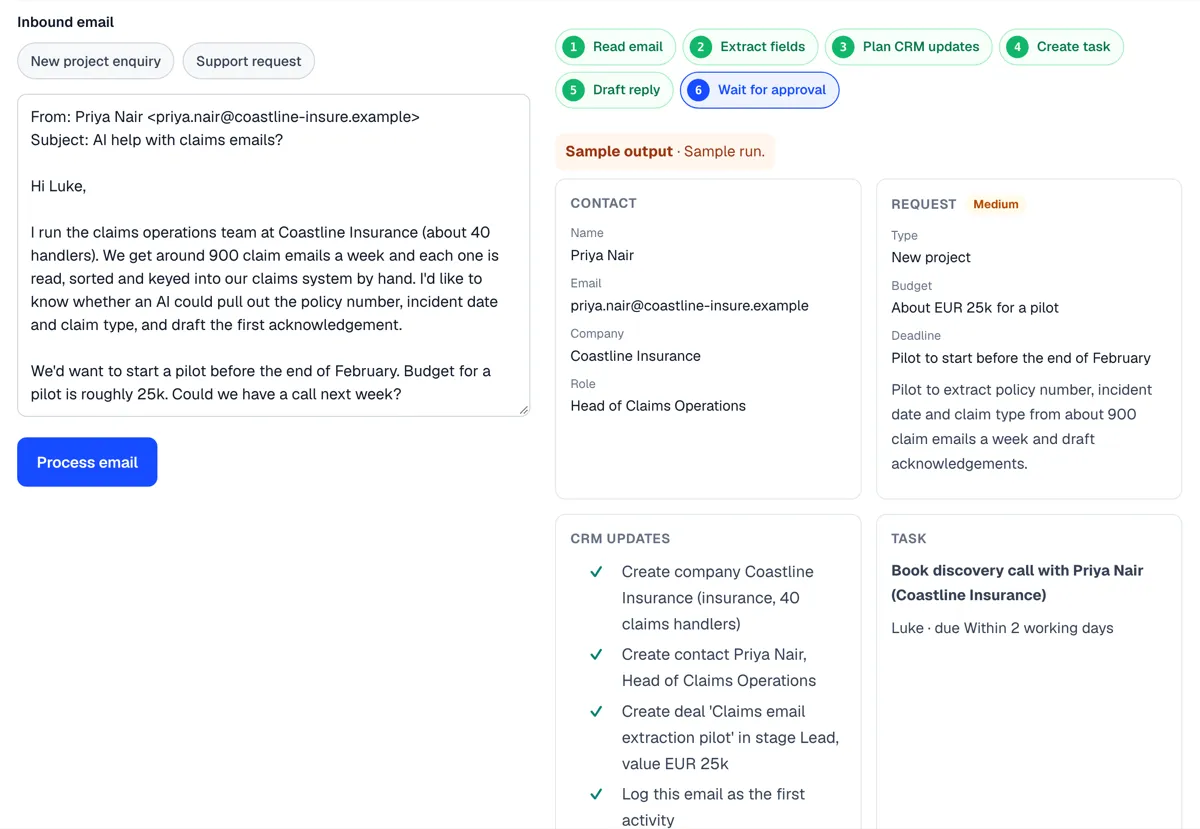 Already builtEmail to CRM in one approvalContact, request, CRM updates, task and reply extracted from one email and held for a click.Try the inbox workflow →
Marketing teams that want to be cited by ChatGPT, Gemini and AI Overviews, and produce more with less.
Measurement of how AI engines describe your brand, technical fixes that make your site retrievable, and content workflows that keep your voice and claims accurate.
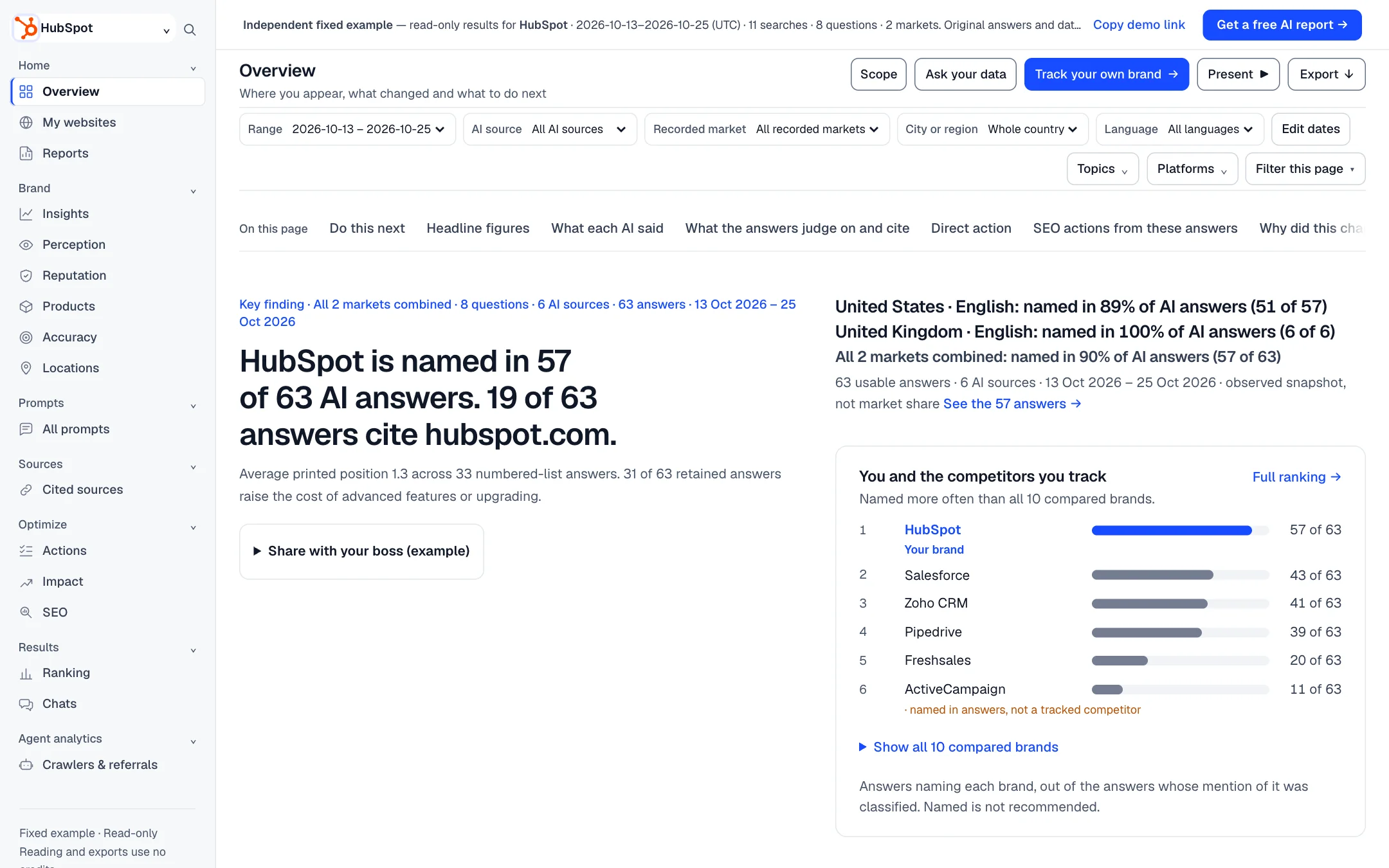 Already built7 AI and search engines measuredIndexHalo keeps every AI answer about a brand as evidence, with counts instead of vague scores.See IndexHalo →
The same terms apply to a two-week audit and a three-month build.
We talk through the work and whether AI is the right tool for it. No cost, no obligation.
Scope, timeline and a fixed price in writing before any work starts.
A first version on your own data in the first weeks, so decisions rest on something real.
We agree how the result will be judged before the build, and it is measured against that.
Code, prompts, evaluation sets and documentation transfer to you on final payment.
NDA on request, GDPR-aware design, and local models when data must not leave your machines.
Six steps, the same for a two-week proof of concept and a three-month build.
A call about the work, the people who do it, the systems involved and what a good result looks like. No cost and no obligation.
A written proposal: what will be built, where it runs, which models it uses, what it will cost to run, how we will test it and the price.
A first working version early, on your own data, so decisions are made on something real.
Weekly demos and a shared board. You see progress as working software, not status reports.
Tests and evaluation sets prove quality, speed and cost before launch, and keep proving them after.
Code, prompts, documentation and a walkthrough for your team, with optional support afterwards.
A defined outcome for a fixed price.
We agree the scope, milestones and acceptance tests up front. You pay per milestone and own the result.
Best for A new application, harness, CRM or proof of concept.
Day-rate work inside your team.
I join your team for an agreed number of days a week, remotely or on-site in Munich, and work in your repositories and rituals.
Best for Extra senior capacity for an AI build already under way.
Advice and reviews by the day or hour.
Architecture reviews, model and vendor selection, cost reduction for existing AI features, and second opinions before a large commitment.
Best for Decisions that need someone who has built it before.
A monthly allowance of improvement and support.
Monitoring, model upgrades, new features and fixes for systems I built or inherited, at a predictable monthly cost.
Best for Keeping an AI system accurate as models and data change.
Employment, in Munich or remote.
I am open to permanent and fixed-term roles building AI software, agent harnesses and AI products.
Best for Teams hiring an AI engineer, AI product engineer or applied AI lead.
You do. Source code, prompts, evaluation sets and documentation transfer to you on final payment unless we agree otherwise in writing.
Yes. I am happy to sign your NDA before we discuss anything confidential.
I design for GDPR from the start: data minimisation, EU hosting where needed, and local models when data must not leave your machines. Client data is never used to train anything.
Anthropic Claude, OpenAI, Google Gemini, DeepSeek, Qwen and Kimi through their APIs, and open-weight models locally through Ollama, LM Studio, llama.cpp and MLX. I choose per task on quality, speed and cost.
Yes. Most work connects to systems teams already use: CRMs such as HubSpot, email, shared drives, databases, internal APIs and MCP servers.
Yes. I am based in Munich and work remotely across time zones, with on-site days in Germany when they help.
English (native) and German (B2).
Projects have a fixed price agreed after scoping. Contract and consulting work is billed by the day. Retainers are monthly. You get the price in writing before any work starts.
You can run the system yourself with the handover documentation, or keep me on a retainer for monitoring, model upgrades and new features.
Tell me what you need built. I reply personally, usually within one working day, and the first call costs nothing.